Neocortex Logo

Unity WebGL

Voice AI NPCs in the browser

Unity's Microphone class does not work in WebGL builds. The Neocortex SDK bridges the browser's microphone into Unity, so players can talk to characters in a web build.

  • Free plan
  • No credit card
  • Unity, Unreal, Godot and Web API
Cora, the Neocortex AI character, waving hello

Powered by Industry Leaders

CDG Booster ProgramTehnopol AI AcceleratorNvidia Inception ProgramMicrosoft Partner | Microsoft for StartupsAWS Partner | AWS StartupsCloudflare Startup ProgramFal AI Startup ProgramElevenLabs Grants

Get started

From zero to a talking character in Unity WebGL

  1. 1

    Install the Unity SDK

    Add the package from git URL:

    https://github.com/neocortex-link/neocortex-unity-sdk.git
  2. 2

    Switch to the WebGL template

    Select the Neocortex WebGL template in Player Settings so the browser's audio reaches Unity.

  3. 3

    Build and talk

    Use the same voice components as desktop, build for WebGL and host over HTTPS.

Requirements

  • Unity 6 (6000.0) or later
  • HTTPS hosting (browsers require it for microphone access)
  • A free Neocortex account and API key
Read the Unity WebGL docs

What you get

Built for Unity WebGL developers

01

Microphone in WebGL

Browser audio bridged into Unity through the Neocortex template.

02

Same components

One microphone component for desktop, mobile and WebGL.

03

Streamed replies

Characters start speaking quickly instead of waiting for full audio.

04

No keys in the build

Keep secrets out of client code; meter usage with usage gating.

05

Visual editor

Design and test characters in the browser before you build.

06

Web API too

Not on Unity? Call characters from any web stack over HTTP.

How it works

Characters you design, not prompts you babysit

  • Personality, emotion, knowledge and world are nodes you connect, not prompts you rewrite.
  • Intents and actions turn what a player says into something your game does.
  • Test every character in the browser for free before it reaches your engine.
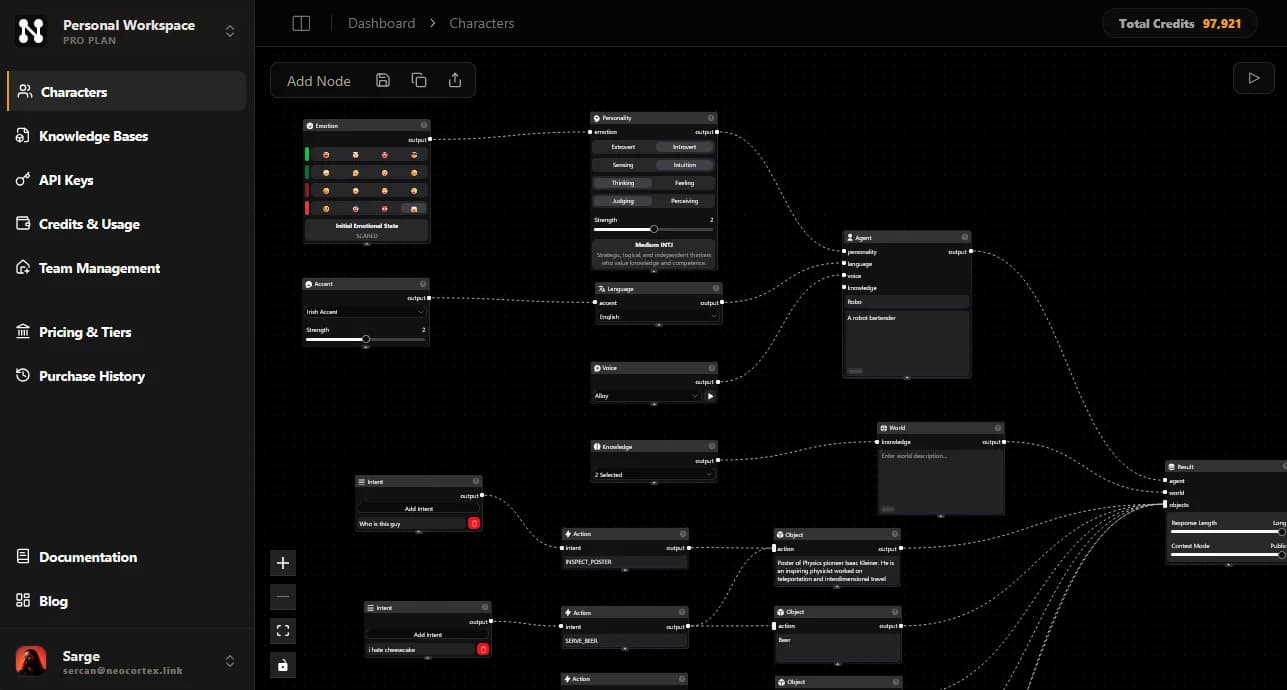
neocortex.link/dashboard/characters
The Neocortex visual character editor with emotion, personality, language, voice, knowledge, intent and action nodes
A bartender character in the Neocortex editor.

What Our Customers Say

Discover what creators are saying about building with Neocortex.

After trying several Smart NPC providers, I came across Neocortex while looking for a stateful conversational AI solution for our Virtual Education platform. Neocortex stood out and topped all our key considerations.

Vallikat Peethamber
Managing Director

Neocortex opened scalable solutions for our VR platform, letting us create scenarios that make training more immersive. Keeping AI agents within clear boundaries is hard, but Neocortex handles it very well and makes customization easy.

Ottó Farkas
IT Specialist / Project Manager

In classroom practice, Neocortex and its action-based mechanism provide students with an out-of-the-box way to bridge conversational agents into software and hardware-based interaction design workflows.

Hongming Li
Lecturer / Instructor

I found out about Neocortex while I was working on my final-year project, and the platform's ease of integration and accessibility enabled me to seamlessly implement smart NPCs in my application. Highly recommend it!

Angela Pellillo
Backend Developer

Neocortex was the first step in bringing LLM-powered NPCs into a real Unity3D prototype, fast-tracking development and growing my TikTok account from 0 to 4000 followers within a month!

Brandan Chen
Associate Game Producer

After trying several Smart NPC providers, I came across Neocortex while looking for a stateful conversational AI solution for our Virtual Education platform. Neocortex stood out and topped all our key considerations.

Vallikat Peethamber
Managing Director

Neocortex opened scalable solutions for our VR platform, letting us create scenarios that make training more immersive. Keeping AI agents within clear boundaries is hard, but Neocortex handles it very well and makes customization easy.

Ottó Farkas
IT Specialist / Project Manager

In classroom practice, Neocortex and its action-based mechanism provide students with an out-of-the-box way to bridge conversational agents into software and hardware-based interaction design workflows.

Hongming Li
Lecturer / Instructor

I found out about Neocortex while I was working on my final-year project, and the platform's ease of integration and accessibility enabled me to seamlessly implement smart NPCs in my application. Highly recommend it!

Angela Pellillo
Backend Developer

Neocortex was the first step in bringing LLM-powered NPCs into a real Unity3D prototype, fast-tracking development and growing my TikTok account from 0 to 4000 followers within a month!

Brandan Chen
Associate Game Producer

Proven at the Supercell Global AI Game Hackathon

Neocortex powered all three top games in a category, plus the winner of a second category.

Read the story

FAQ

Neocortex for Unity WebGL: common questions

Why doesn't my Unity microphone work in WebGL?

Unity's Web platform documentation lists the Microphone class as not supported, because browsers handle microphone access themselves.

How does Neocortex enable voice in WebGL?

The Neocortex WebGL template connects the browser's microphone to Unity, and the SDK's audio components use it automatically.

Do I need HTTPS?

Yes. Browsers only grant microphone access on secure pages, and the microphone starts after a user gesture such as a click.

Can I run a local LLM in WebGL?

Local models are rarely practical in the browser because of download size and memory, so WebGL builds normally use cloud inference.

Comparing tools?

How Neocortex compares for Unity WebGL teams

Put a talking NPC in your web build

Free plan, no credit card. Build a character in the browser and talk to it in minutes.