Meta Quest via Unity
AI NPCs for Meta Quest
Players talk to characters instead of picking lines with a controller. Design the character in the browser and bring it into your Unity XR project with the Neocortex Unity SDK. The model runs on Neocortex servers, not on the headset.
- Free plan
- No credit card
- Unity, Unreal, Godot, Web SDK and Web API
5
ways to integrate
Unity, Unreal, Godot, Web SDK, Web API
20+
languages
set per character
10 s
to clone a voice
or design one from text
€0
to start
free plan and editor testing
Powered by Industry Leaders








Get started
From zero to a talking character in Meta Quest
What you get
Built for Meta Quest developers
Hands-free voice
Voice detection by default, or push-to-talk on a controller button, with the Android microphone permission handled.
Light on the headset
The Quest records the player and plays the reply. The character's model runs on Neocortex servers.
Open-source VR demo
A scene on GitHub built with the XR Interaction Toolkit, with voice chat and a chat panel you can move.
Objects it can act on
Mark objects as Interactable, and the character can talk about them and target them with actions.
Lip sync and emotion
The Face Animator moves the mouth as the character speaks, and every line carries an emotion for expressions.
Same character everywhere
The character you build also works in Unreal, Godot and on the web.
Voice starts sooner
Characters start speaking as the voice arrives instead of waiting for the whole clip.
Remembers the player
The SDK saves a session per character, so the NPC picks up the conversation next time the headset is on.
Several NPCs at once
NeocortexGroupDirector puts several characters in one conversation and decides who answers, on a Pro or Team plan.
How it works
Characters you design, not prompts you babysit
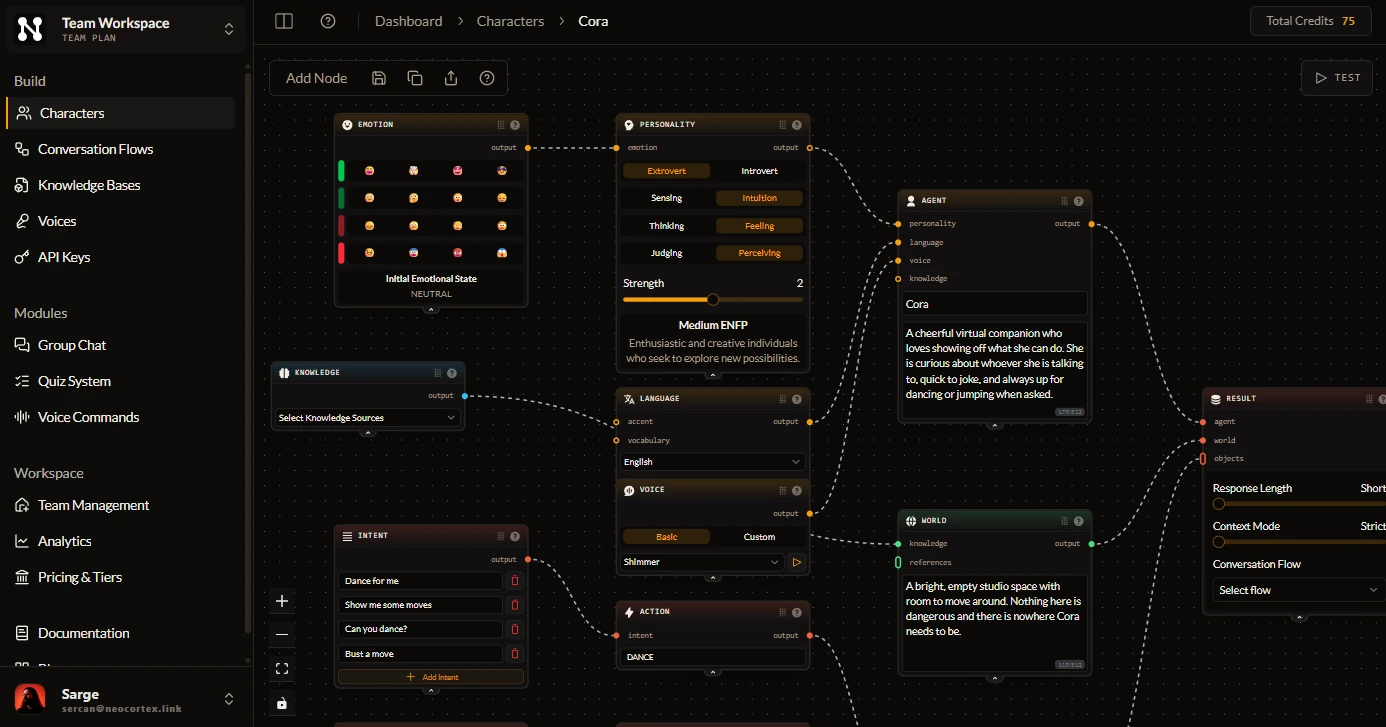
- Personality, emotion, knowledge and world are nodes you connect, not prompts you rewrite.
- Intents and actions turn what a player says into something your game does.
- Test every character in the browser for free before it reaches your engine.
What Our Customers Say
Discover what creators are saying about building with Neocortex.

FAQ
Neocortex for Meta Quest: common questions
Is there a Neocortex SDK for Meta Quest?
Not a separate one. Meta Quest apps use the Neocortex Unity SDK in a Unity XR project, for example with the XR Interaction Toolkit.
Does it work offline on the headset?
No. Characters run on Neocortex servers, so the headset needs an internet connection. Studios can also run the Neocortex platform on their own infrastructure.
Is there a VR demo to start from?
Yes. Our open-source VR demo on GitHub pairs the Neocortex Unity SDK with the XR Interaction Toolkit for voice chat with an NPC.
Can players talk without pressing a button?
Yes. The Audio Receiver listens with voice detection by default. Switch to push-to-talk if players prefer holding a trigger.
Can I run a quiz show in VR?
Yes. The Unity SDK's NeocortexQuizAgent runs on Meta Quest like the rest of the SDK, so a character can host a spoken quiz in the headset from a question set you write in the dashboard. Quizzes need a Team plan.
Can I limit how much each player uses?
Yes. The Unity SDK sends each device's id as the player id, so per-player credit limits set in the dashboard apply per headset. NeocortexUsageGate checks them before a message is sent.
Can the character speak in a custom voice?
Yes. A character can speak in a basic, cloned or designed voice, set in the editor and used the same way in the headset. Cloned voices need a Pro or Team plan.
Comparing tools?
How Neocortex compares for Meta Quest teams
Convai alternative
Convai's $29 plan stops at 3,000 replies, 75 players a month and one conversation at a time. Neocortex puts no cap on players or simultaneous conversations, for games, VR, XR and training.
Inworld AI alternative
Inworld moved its focus to voice and inference for consumer apps and retired Character Studio. Neocortex keeps character design visual, game-first and in your engine.
Charisma.ai alternative
Charisma.ai's website now redirects to Charismatic Studio, an AI production studio, and its docs and app no longer load. Join Neocortex today: rebuild your characters in a visual editor, share them with anyone through a public link, and ship them in Unity, Unreal, Godot and on the web.
Talk to your NPC in VR
Free plan, no credit card. Build a character in the browser and talk to it in minutes.