The Neocortex Godot SDK Is Out: Voiced AI NPCs for Godot 4
Godot is the engine most AI character platforms skip. Not anymore: our Godot SDK is out. Design a character on Neocortex, drop the addon into your Godot 4 project, and players can talk to it out loud, hear it answer in its own voice, and watch it act in your world.
It's open source, it works from GDScript, and it ships with seven sample scenes so you can see everything running before you build your own.
What the Godot SDK adds to your game
- Characters players can talk to, by typing or out loud.
- A voice and an emotion on every line, so animations and portraits can follow the mood.
- Actions that run your own code, like opening a door or handing over an item.
- Awareness of the scene, so characters know what's around them.
- Lip sync, group conversations and quiz hosts.
- Memory, so a conversation picks up where it left off.
AI dialogue in Godot without dialogue trees
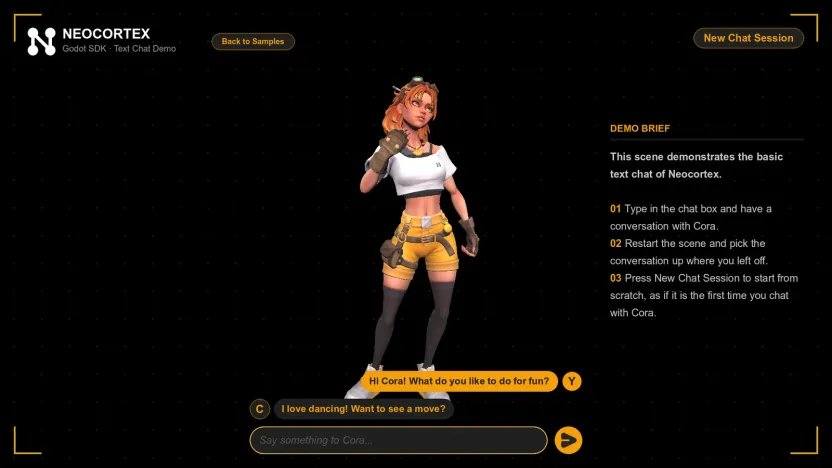
Branching dialogue trees break the moment a player asks something you didn't write. With Neocortex, you design the character instead of every line: its personality, what it knows about your world, how it speaks and what it's allowed to do. You test it in the browser until it sounds right, then use the same character in Godot.
Each reply arrives as a series of lines, each with its own emotion, so a shopkeeper can sound pleased about a sale and annoyed about a haggle in the same answer. The character also remembers the conversation, and you can send it recent gameplay events, such as "the player just won the duel", so its answers fit what happened. Our guides on unique NPC personalities and NPC memory go deeper on the design side.
Voice chat with NPCs in Godot
Players can speak instead of type. The SDK records the microphone with voice detection or push to talk, turns the speech into text, and the character answers in its own voice. The voice starts playing while the rest of the reply is still being generated, so conversations don't stall.
You choose how replies are voiced: each line in its own emotion, the whole reply as one clip, or text only. On Android, the SDK asks for microphone permission when it starts. Our post on the AI NPC voice pipeline explains what happens between the microphone and the speaker.
Godot NPCs that act on what they say
Talking is half of it. Give a character actions in the editor, such as GIVE_ITEM, OPEN_DOOR or FOLLOW_PLAYER, and connect each one to a GDScript function:
@onready var agent: NeocortexSmartAgent = $Blacksmith/NeocortexSmartAgent

func _ready() -> void:
	agent.chat_line_started.connect(func(line: NeocortexChatLine): $Subtitle.text = line.text)
	agent.register_action("GIVE_ITEM", _give_item)

func _give_item(action: NeocortexChatAction) -> void:
	inventory.give(action.target_id)  # your own inventory code
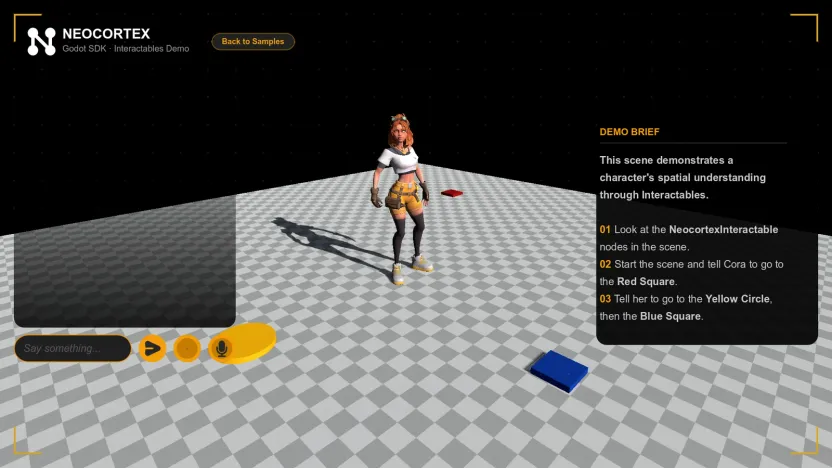
The character asks, your game decides. Mark objects in your scene as interactables, and the character knows what's nearby and can aim its actions at them: "go to the red square, then the blue one" becomes two actions, each with a target. A reply can carry several actions, run one after another.
Lip sync, group conversations and quizzes
- Lip sync: the character's mouth moves with its words on ARKit-style blend shapes, the standard most character models already use.
- Group conversations: put several characters in one scene, let them talk to the player and to each other, and have them join or leave while the conversation runs.
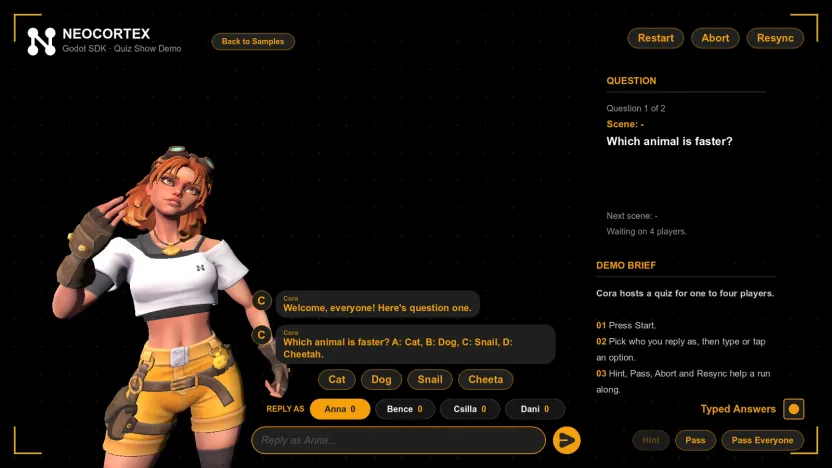
- Quiz hosts: a character runs a quiz from your question set for one or more players, with hints, passes and scores handled for you.
How to add AI NPCs to Godot 4
- Download the latest release and copy
addons/neocortex-godot-sdkinto your project. - Enable Neocortex in Project Settings > Plugins, and paste your API key in the Neocortex dock.
- Pick Project > Tools > Neocortex > Complete Voice Chat, choose your character, and press Play.
The Godot quick start has the details, and our tutorial on adding AI NPC dialogue in Godot 4 builds a full blacksmith scene step by step.
The Godot SDK or your own LLM integration?
You can send text to an LLM API with Godot's HTTPRequest node and print the answer. That's a good weekend prototype. A character players will spend hours with needs more: speech recognition, a voice per character, emotions, memory across sessions, actions your game can trust, and limits so one player can't run up your bill.
The SDK covers all of that, and per-player and per-character usage limits on each API key are enforced on our servers. For a wider look at the options, see our roundup of AI NPC tools for Godot.
Open source
The SDK is on GitHub under Apache 2.0, so issues and pull requests are welcome. The same characters also work in Unity, Unreal Engine and the web, so a character you design for a Godot game can follow you to your next project.
Tell us what your Godot game needs next on our Discord.
Frequently Asked Questions
Is there an AI NPC plugin for Godot?
Yes. The Neocortex Godot SDK is an open-source editor plugin for Godot 4.7 and later. It adds voiced AI characters with emotions, actions, lip sync, group conversations and quizzes to your project.
How do I add AI dialogue to NPCs in Godot?
Design the character in Neocortex, add the Godot SDK to your project's addons folder, enable the plugin and paste your API key. Then add a chat scene from Project > Tools > Neocortex, or call text_to_audio on a NeocortexSmartAgent from GDScript.
Can I use ChatGPT or another LLM for Godot NPCs?
You can call an LLM API yourself with Godot's HTTPRequest node, but you then build the voice, emotions, memory and actions on top. The Neocortex Godot SDK gives you all of that in one addon, with characters you design in a visual editor.
Can players talk to Godot NPCs with their voice?
Yes. The player speaks into the microphone, with voice detection or push to talk, and the character answers in its own voice with an emotion on every line.
Does the Godot SDK support lip sync?
Yes. NeocortexFaceAnimator moves ARKit-style mouth blend shapes on your character's mesh as it speaks.
Can AI NPCs in Godot trigger gameplay?
Yes. Give a character actions such as GIVE_ITEM or OPEN_DOOR, and each one calls a GDScript function you register. Actions can target objects in the scene, and your code decides whether they run.
Which Godot versions does the SDK support?
Godot 4.7 or later.
Is the Neocortex Godot SDK open source?
Yes. It's on GitHub under the Apache 2.0 license.
Written by
Neocortex Team
Date
Nov 10, 2026
Read time
6 min